 CalcWorks
Your graphing calculator, now online.
CE-AI adds WiFi, an AI assistant and file transfer from any browser to the TI-84 Plus CE. The hardware sits entirely inside the calculator's case: no dongles, no cables, no laptop.
For adults 18+. Not permitted in exams. Why?
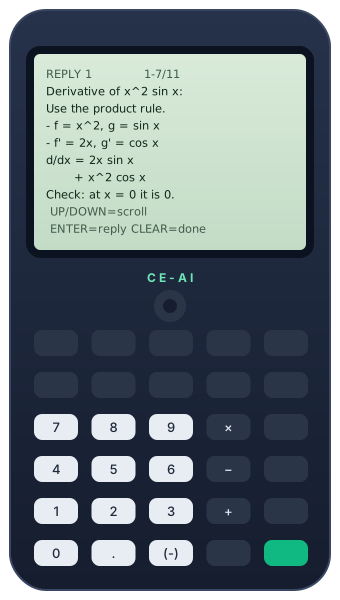
Everything happens on the calculator.
CE-AI runs as a program on the calculator and talks to a small WiFi module installed inside it. Type on the keypad, read on the screen.
An AI assistant
Ask a question, get a readable answer on the screen and follow up with ENTER. It remembers the conversation, and the last eight answers stay in your Inbox.
WiFi, set up on the keypad
Scan for networks, pick one and type its password, right on the calculator. Settings shows the network you're on and how strong the signal is.
Send files from any browser
Drop a program, appvar or group on calcworks.tech/transfer from any computer or phone. Open RECEIVE FILE on the calculator and press ENTER to save it.
Built in, not bolted on
The WiFi module and its power supply fit inside the calculator and run from its own battery. On the outside it looks like the calculator you already have.
Private by design
Each calculator has its own random 128-bit pairing code. Files are deleted once they're received, or after 24 hours. The site uses no cookies and no tracking.
Open source
The calculator program, the WiFi firmware and this website are published under the MIT License, so you can see exactly what runs on your calculator. View the code
Three steps from the box to your first answer.
Connect to WiFi
Open Settings → WIFI SETUP, choose your 2.4 GHz network and type the password. The calculator remembers it.
Ask anything
Choose SEND MSG, type your question and press ENTER. Scroll the answer line by line, press ENTER to follow up, or CLEAR when you're done.
Pair for file transfer
Enter the code from Settings → PAIRING CODE on calcworks.tech/transfer once. After that, any file you send shows up on RECEIVE FILE.
A learning tool, not a test tool.
CE-AI is for homework, studying, programming and tinkering. SAT, ACT, AP and IB exams, and most classroom tests, don't allow calculators that can connect to the internet or use AI. That includes CE-AI. Take a calculator without CE-AI into exams, and follow your school's rules.
The AI assistant uses Google's Gemini API, whose terms require users to be 18 or older, so CE-AI is sold to adults only.
Good to know before you buy
- AI answers can be wrong. Check anything that matters.
- Online features need a 2.4 GHz WiFi network.
- Opening and modifying the calculator voids Texas Instruments' warranty. Our own limited warranty covers the CE-AI hardware.
- CE-AI uses some of the calculator's battery. More details
Be first to know when CE-AI is available.
CE-AI calculators aren't on sale yet. Join the waitlist and we'll email you once when they are. No newsletters, and we never sell your email.
Already have one? Send a file or get help.